
| 일 | 월 | 화 | 수 | 목 | 금 | 토 |
|---|---|---|---|---|---|---|
| 1 | 2 | 3 | 4 | 5 | ||
| 6 | 7 | 8 | 9 | 10 | 11 | 12 |
| 13 | 14 | 15 | 16 | 17 | 18 | 19 |
| 20 | 21 | 22 | 23 | 24 | 25 | 26 |
| 27 | 28 | 29 | 30 |
- shader
- json
- unity
- Python
- texture
- 개발
- UI
- language
- vm instance
- gpgs
- GCP
- c#
- Dot
- AR
- Specular
- Google Play Console
- tool
- Class
- google signin
- google play games services
- jackandthebeanstalk
- BigData
- RIM
- UX
- Standard
- Firebase
- 파이썬
- 언어
- smoothness
- python3
- Today
- Total
Crazy Lazy
얼굴 인식을 이용한 가면 모델 보여주기. 본문
얼굴을 인식하여 가면 모델을 나타나게 해주는 AR 프로그램.
1. Project & Package.
아래 링크의 3번까지 참조할 것.
https://crazy-lazy.tistory.com/153
지형 인식을 이용한 자동차 모델 보여주기.
바닥면을 인식하여 해당 바닥을 터치하면 자동차 모델을 나타나게 해주는 AR 프로그램. 1. Create Project.1) Type : 3D (Built-In Render Pipeline)2) Name : MyAR_Project3) Build Profiles > Android > Switch Platform.4) Game > Displ
crazy-lazy.tistory.com
아래 파일들을 다운받아 프로젝트에 넣기.
https://assetstore.unity.com/packages/essentials/asset-packs/ar-face-assets-184187
AR Face Assets | 에셋팩 | Unity Asset Store
Get the AR Face Assets package from Unity Technologies and speed up your game development process. Find this & other 에셋팩 options on the Unity Asset Store.
assetstore.unity.com
2. Materials.
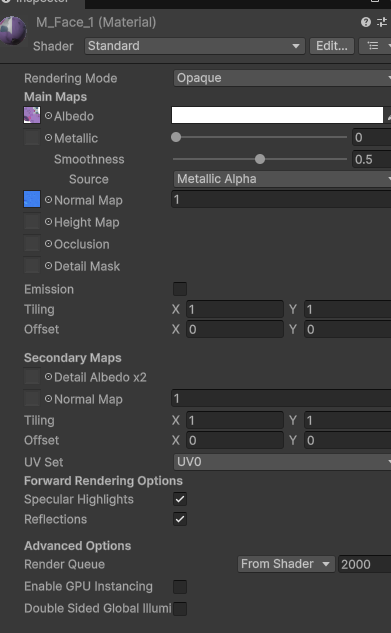
1) M_Face_1 : Plasto_Head_Albedo.png & Plasto_Head_normal.png 를 각각 할당.
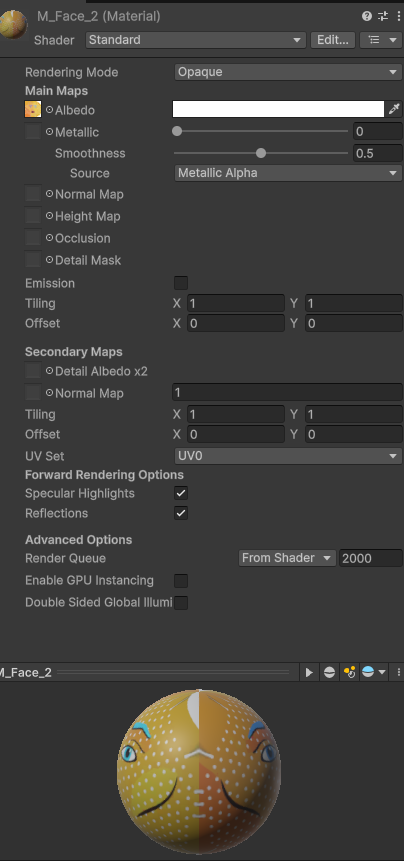
2) M_Face_2 : PopFace_Albedo.png 를 할당.
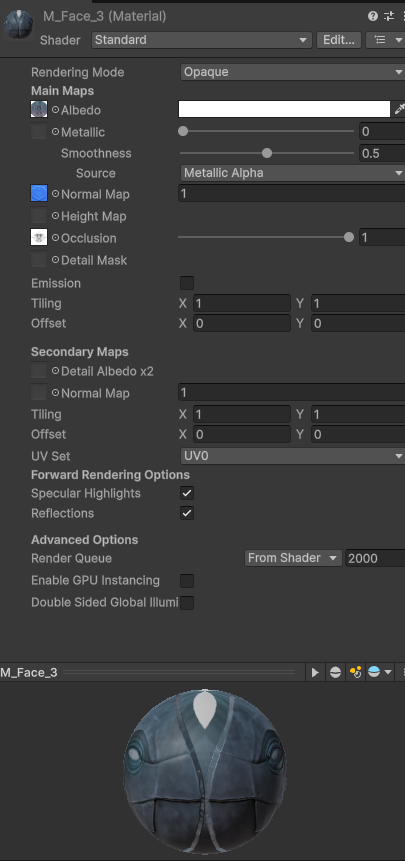
3) M_Face_3 : Robot_Albedo.png & Robot_Normal.png 를 할당.
3. Prefabs.
1) Mask :

2) MyFaceModel :
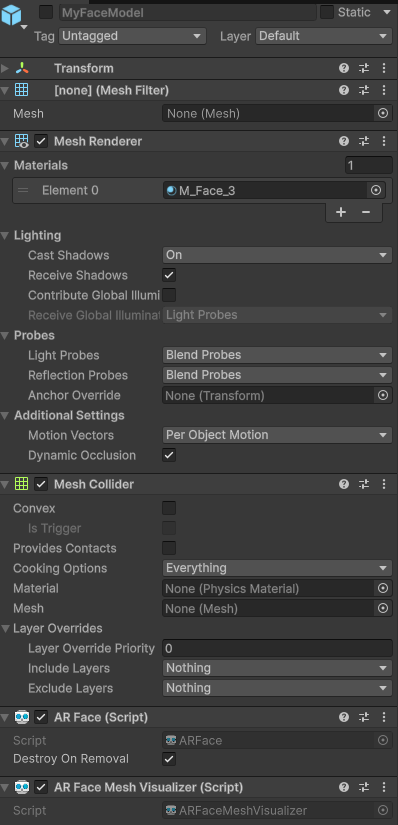
3) MyMask :
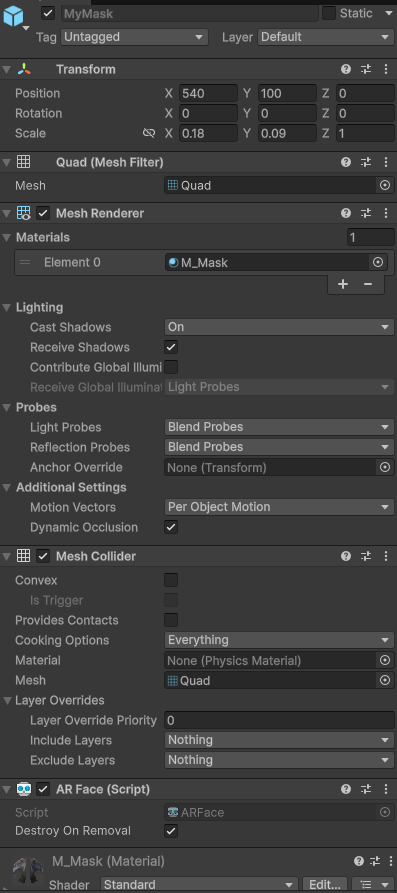
4. Hierarchy.
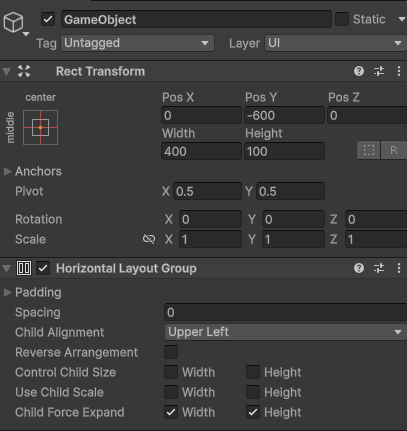
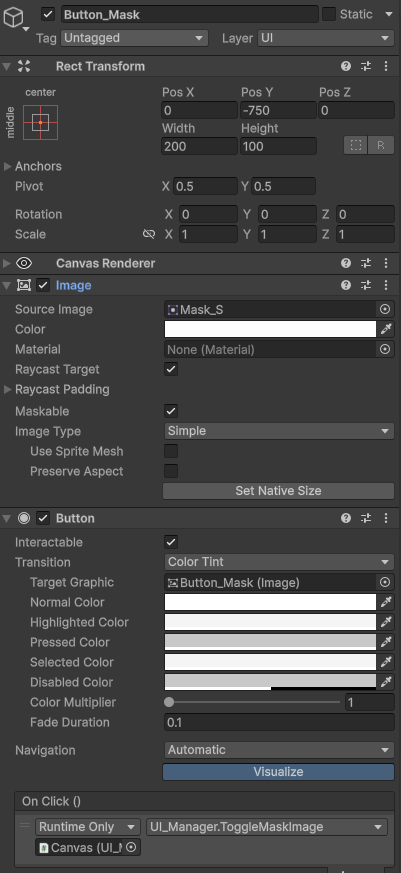
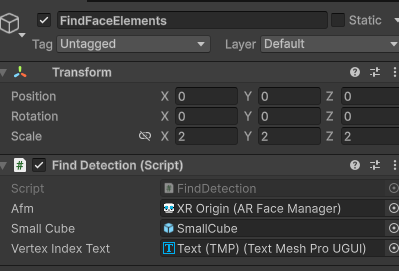
1) FaceScene 생성.
2) Hierarchy 를 아래와 같이 구성.
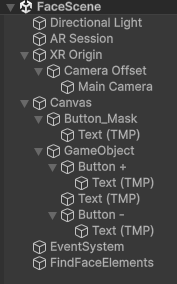
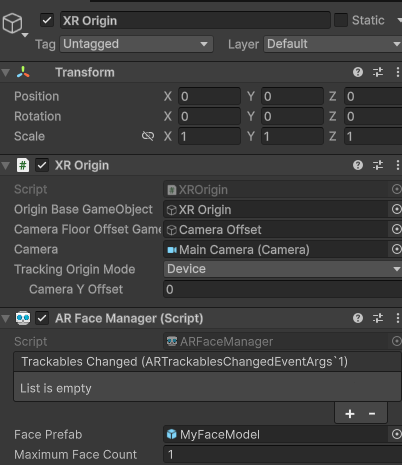

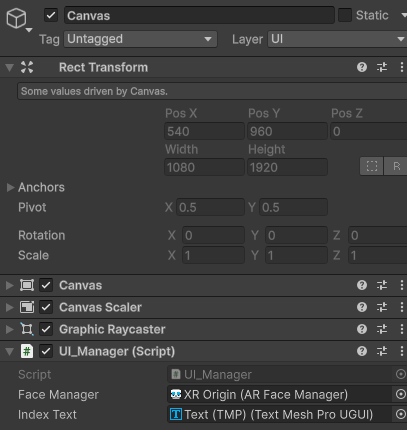


5. Scripts.
1) FindDetection.cs
using System.Collections.Generic;
using TMPro;
using Unity.Collections;
using UnityEngine;
using UnityEngine.XR.ARCore;
using UnityEngine.XR.ARFoundation;

public class FindDetection : MonoBehaviour
{
    public ARFaceManager afm;
    public GameObject smallCube;
    public TMP_Text vertexIndexText;

    private List<GameObject> _faceCubes = new List<GameObject>();
    private ARCoreFaceSubsystem _subsystem;
    private NativeArray<ARCoreFaceRegionData> _regionDatas;

    void Start()
    {
        for (int i = 0; i < 3; i++)
        {
            var go = Instantiate(smallCube);
            _faceCubes.Add(go);
            go.SetActive(false);
        }
        _subsystem = (ARCoreFaceSubsystem)afm.subsystem;

        // afm.trackablesChanged.AddListener(OnDetectThreePoints);
        afm.trackablesChanged.AddListener(OnDetectFaceAll);
    }

    private void OnDetectThreePoints(ARTrackablesChangedEventArgs<ARFace> face)
    {
        if (face.updated.Count > 0)         // 얼굴 인식 정보가 갱신 된 것이 있을 경우
        {
            // 인식된 얼굴의 특정 위치를 가져오기
            _subsystem.GetRegionPoses(face.updated[0].trackableId, Allocator.Persistent, ref _regionDatas);
            // 인식된 얼굴의 특정 위치 (0: 코, 1: 이마 좌측, 2: 이마 우측)에 오브젝트를 위치 시킨다.
            for (int i = 0; i < _regionDatas.Length; i++)
            {
                _faceCubes[i].transform.position = _regionDatas[i].pose.position;
                _faceCubes[i].transform.rotation = _regionDatas[i].pose.rotation;
                _faceCubes[i].SetActive(true);
            }
        }
        else if (face.removed.Count > 0)    // 얼굴 인식 정보를 잃었을 경우
        {
            // 오브젝트를 비활성화.
            for (int i = 0; i < _regionDatas.Length; i++)
            {
                _faceCubes[i].SetActive(false);
            }
        }
    }

    private void OnDetectFaceAll(ARTrackablesChangedEventArgs<ARFace> args)
    {
        if (args.updated.Count > 0)//얼굴을 인식 했을 때
        {
            int num = int.Parse(vertexIndexText.text);

            //얼굴 정점 배열에서 지정한 인덱스에 해당하는 좌표를 가져온다.
            Vector3 verPosition = args.updated[0].vertices[num];
            Debug.Log(verPosition);
            //준비된 큐브 하나를 활성화 하고 정점 위치에 가져다 놓는다.
            _faceCubes[0].SetActive(true);
            _faceCubes[0].transform.position = args.updated[0].transform.TransformPoint(verPosition);
        }
        else if(args.removed.Count > 0)//얼굴을 인식 하지 못했을 때
        {
            _faceCubes[0].SetActive(false);
        }
    }
}
2) UI_Manager.cs
using TMPro;
using UnityEngine;
using UnityEngine.XR.ARFoundation;
using UnityEngine.XR.ARSubsystems;

public class UI_Manager : MonoBehaviour
{
    public ARFaceManager faceManager;
    public TMP_Text indexText;

    private int vertNum = 0;
    private int vertCount = 468;

    void Start()
    {
        indexText.text = vertNum.ToString();
    }

    public void IndexIncrease()
    {
        // verNum 1증가, 최대 인덱스 넘지 않게.
        int number = Mathf.Min(++vertNum, vertCount - 1);
        indexText.text = number.ToString();
    }

    public void IndexDecrease()
    {
        // verNum 1감소, 최소 인덱스 넘지 않게.
        int number = Mathf.Max(--vertNum, 0);
        indexText.text = number.ToString();
    }

    public void ToggleMaskImage()
    {
        // faceManager 컴포넌트에서 현재 생성된 face 오브젝트들을 모두 순회.
        foreach (ARFace face in faceManager.trackables)
        {
            // 얼굴 인식 시
            if (face.trackingState == TrackingState.Tracking)
            {
                // face 오브젝트의 활성화 상태를 반대로 변경.
                face.gameObject.SetActive(!face.gameObject.activeSelf);
            }
        }
    }
}
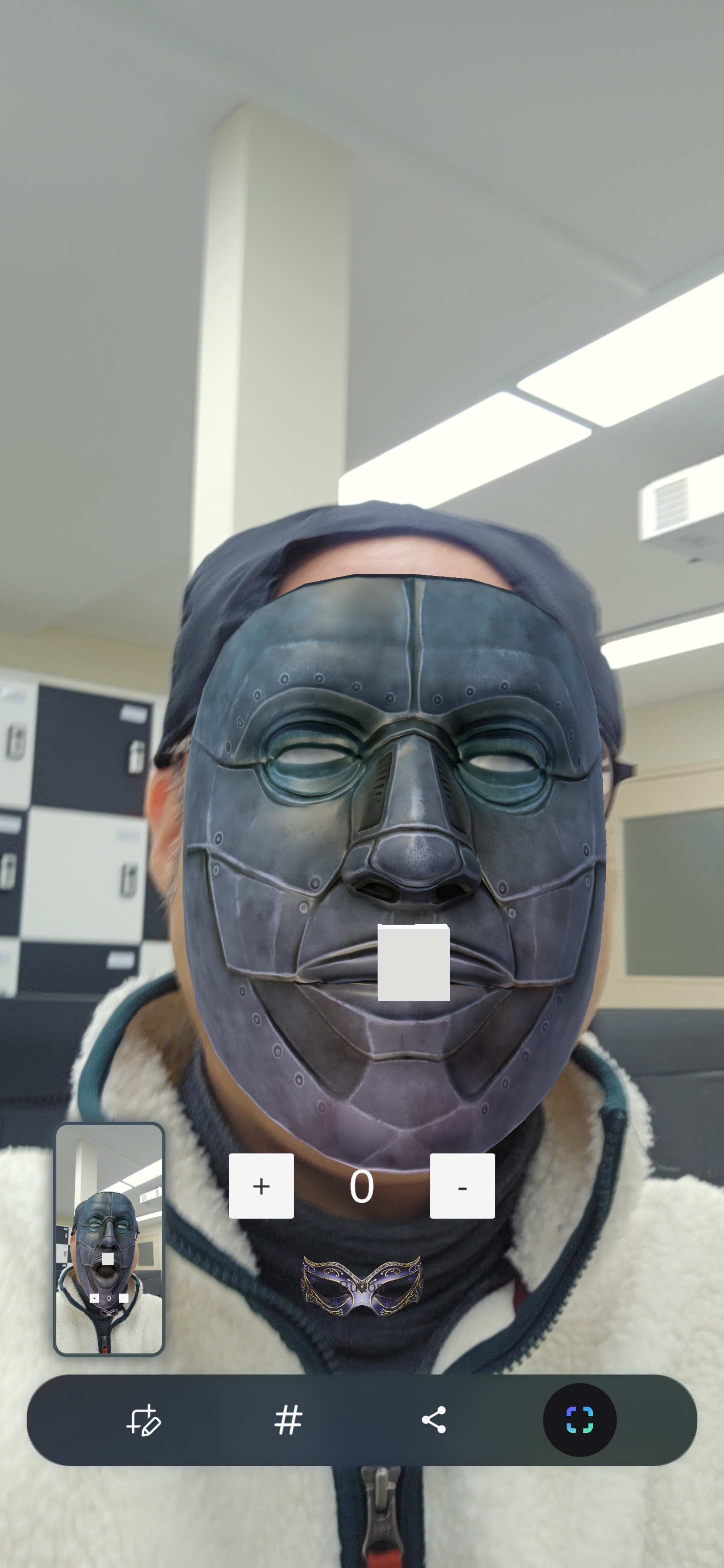
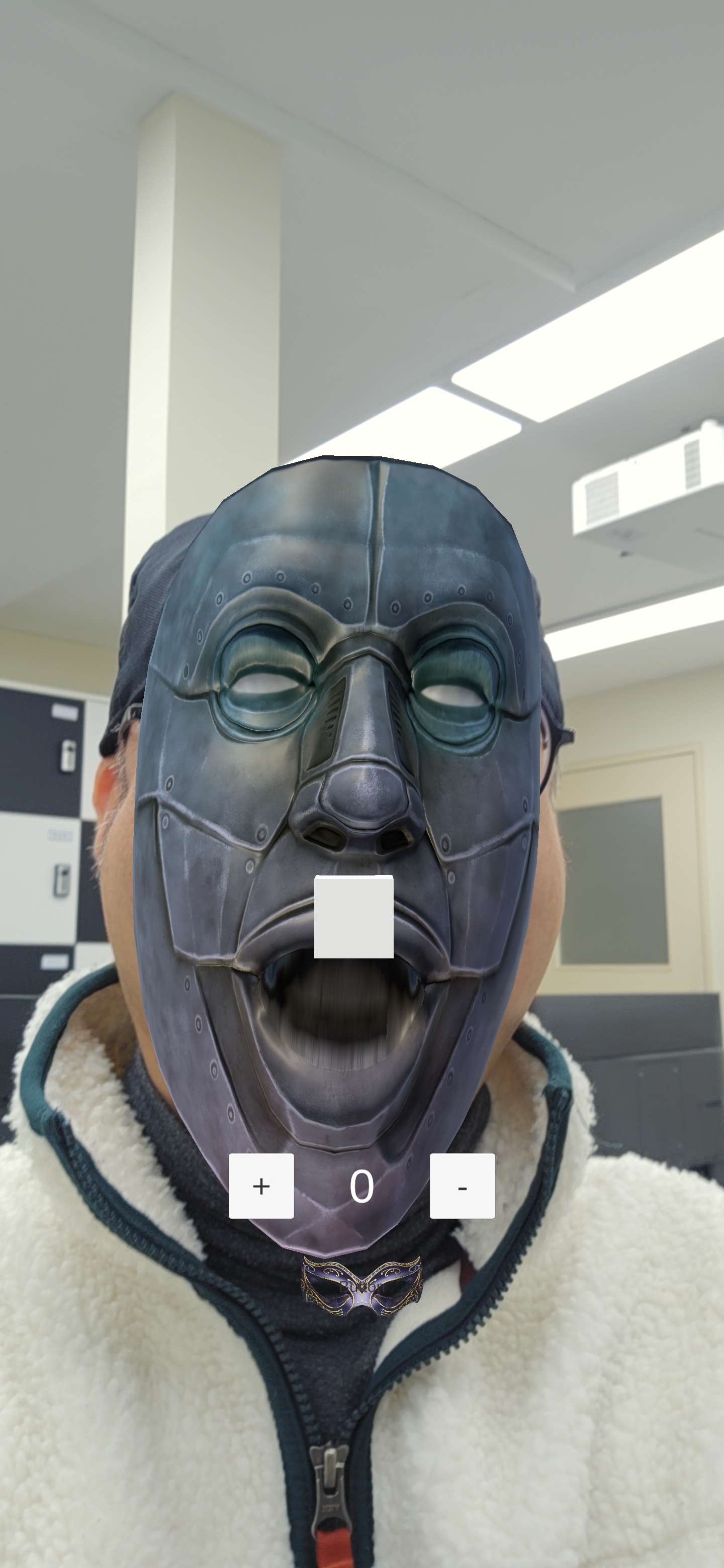
6. Result.
Face3 을 활성화하고, 코 부분에 큐브를 띄운 모습.
'Unity > AR 프로그래밍' 카테고리의 다른 글
| 마커를 이용한 고양이 모델 보여주고 공으로 포획하기. (0) | 2026.02.11 |
|---|---|
| 지형 인식을 이용한 자동차 모델 보여주기. (0) | 2026.02.09 |


